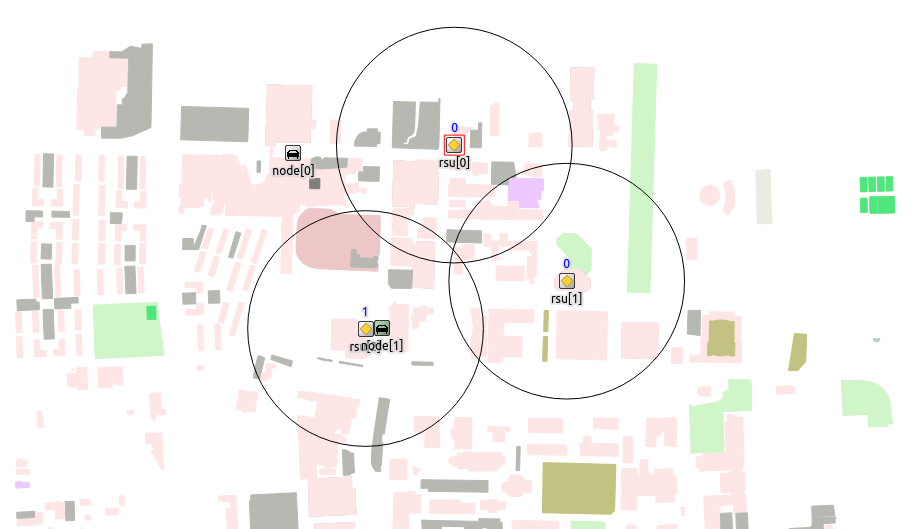
通过前面几篇教程,大家应该能够成功跑出Demo并且可以通过修改应用层等代码实现自己的功能。但是大家肯定觉得很奇怪为什么通过OSMWebWizard导出的明明是好看的彩色的地图,使用netedit打开查看时建筑物也是彩色的,但是使用Veins仿真时所有建筑都变成了红色边框无填充的多边形。丑陋的展示,自己可以理解但是给别人演示的时候并不太方便。
这篇教程将从修改建筑颜色入手,讲讲SUMO的TraCI。
Color 首先我们实现建筑物涂色。
pol.xml 我们知道建筑物属性均在pol.xml中定义,打开这个文件可以看到每一个poly标签均为一个建筑,定义了
id type 类型,前面讲过在Veins中使用时需要修改成已经定义过的建筑类型。这里多讲一点,不同的建筑类型可以有不同的信号衰减效率,也可以进一步定义其他功能。目前仿真暂不涉及信号,因此把所有类型改成building,并将building的衰减均设为0 color 颜色,OSMWebWizard导出的颜色大多为RGB,少数为颜色名称 fill 是否填色,1为填色 layer 叠层,由于之后讲解的TraCI中不提供这个参数的修改和查询,可以忽略 shape 顶点坐标 Structure 下一步就是要找到具体哪个模块涉及颜色载入的功能。那就需要弄清楚涉及的具体的控制流程。
一个简单的办法就是全局搜索。由于Veins中所有建筑都是红色,我们可以直接全局搜索red即可。在OMNet++顶栏点击Search - Search即可打开全局搜索。结果中src下有三个文件夹有搜索结果,简要分析一下。之前讲过obstacle与建筑相关,并且该文件夹中有一个ObstacleControl.cc文件有搜索结果,可以从这里入手。
打开ObstacleControl.cc首先查看initialize初始化函数,可以发现最后有一个addFromXml,显然这是一个从xml添加项目的函数。查看这个函数可以发现是从xml依次添加标签的函数,但是奇怪的是循环内通过if else判断标签头,而pol.xml中没有type标签头,且他的注释中给了示例明显是config.xml中的建筑类型的配置。可以合理猜测这个文件是从config.xml中添加配置,再推一步config.xml中也可以定义建筑物,并通过if (tag == "poly")分支导入。
可以从pol.xml复制一部分建筑物到config.xml中,然后注释pol.xml中的建筑物,发现是可以正常导入的。不过这种方式会使得config.xml过于臃肿,既要定义建筑类型的衰减效率又要定义建筑本身,因此不推荐这种方式导入建筑。本路线不是本例的重点,但是大家可以在Branch-Color 中查看修改的代码。
addFromXml函数下面有一个addFromTypeAndShape函数,可以猜测这个是”手动”加载建筑。再次通过全局搜索查看哪个模块调用了addFromTypeAndShape函数,可知是src/veins/modules/monility/traci/TraCIScenarioManager.cc中的init_traci函数中调用了。通过前面的学习可知TraCI是SUMO提供的API可用于查询仿真结果,设置参数等等。
再看addFromTypeAndShape函数,可知具体将建筑物添加到画布上是通过add函数通过调用AnnotationManager的drawPolygon函数实现的。
打开 src/veins/modules/world/annotations/AnnotationManager.cc可知drawPolygon函数最终是通过show函数调用traci命令来添加polygon,line以及point
Conclusion 以上就是整个控制流,总结一下就是。
Veins开始仿真的时候,初始化TraCI连接,查询SUMO中载入的polygon,然后通过obstacleControl调用AnnotationManager加载polygon。Annotation就是注解,可以理解为画布上除了仿真以外的东西。
Enable Loading Color 其实刚才梳理流程时,大家应该能够发现ObstacleContol的add函数在调用annotations->drawPolygon函数时直接将颜色定义成red,这是所有建筑为红色的原因。
综合理解以上流程,我们需要从三个方面实现颜色加载:
pol.xml定义color以及fillTraCIScenarioManager.cc中能够通过TraCI的命令获取pol.xml中建筑的color和fill,并传递给obstacleControlobstacleControl将正确的color和fill传递给annotations->drawPolygonannotations的show函数读取color和fill并通过TraCI的命令添加建筑pol.xml 正常导出的pol.xml含有所有属性
TraCIScenarioManager.cc 参照其他代码可知,polygon的属性是通过commandInterface获取polygon的属性。默认的src/veins/modules/mobility/traci/TraCICommandInterface.cc/h中的Polygon没有定义color属性和getColor函数,我们可以如下定义:
1
2
3
4
5
6
7
8
9
10
11
12
13
14
15
16
17
// TraCICommandInterface.h class VEINS_API Polygon { public: Polygon(TraCICommandInterface* traci, std::string polyId) : traci(traci) , polyId(polyId) { connection = &traci->connection; } TraCIColor getColor(); bool getFilled(); std::string getTypeId(); std::list<Coord> getShape(); void setShape(const std::list<Coord>& points); void remove(int32_t layer); ......
1
2
3
4
5
6
7
8
9
10
11
12
13
14
15
16
17
18
19
20
21
22
23
24
25
26
27
28
29
30
31
32
33
34
35
36
37
38
39
40
41
42
43
44
45
46
47
48
49
50
51
52
53
54
55
56
57
58
59
60
61
62
63
64
65
66
67
68
69
70
71
72
73
74
75
76
77
78
79
80
81
82
// TraCICommandInterface.cc TraCIColor TraCICommandInterface::Polygon::getColor() { TraCIColor res(0, 0, 0, 0); TraCIBuffer p; p << static_cast<uint8_t>(VAR_COLOR); p << polyId; TraCIBuffer buf = connection->query(CMD_GET_POLYGON_VARIABLE, p); uint8_t cmdLength; buf >> cmdLength; if (cmdLength == 0) { uint32_t cmdLengthX; buf >> cmdLengthX; } uint8_t commandId_r; buf >> commandId_r; uint8_t responseId = RESPONSE_GET_POLYGON_VARIABLE; ASSERT(commandId_r == responseId); uint8_t varId; buf >> varId; uint8_t variableId = VAR_COLOR; ASSERT(varId == variableId); std::string objectId_r; buf >> objectId_r; std::string objectId = polyId; ASSERT(objectId_r == objectId); uint8_t resType_r; buf >> resType_r; uint8_t resultTypeId = TYPE_COLOR; ASSERT(resType_r == resultTypeId); buf >> res.red; buf >> res.green; buf >> res.blue; buf >> res.alpha; ASSERT(buf.eof()); return res; } bool TraCICommandInterface::Polygon::getFilled() { int filled; TraCIBuffer p; p << static_cast<uint8_t>(VAR_FILL); p << polyId; TraCIBuffer buf = connection->query(CMD_GET_POLYGON_VARIABLE, p); uint8_t cmdLength; buf >> cmdLength; if (cmdLength == 0) { uint32_t cmdLengthX; buf >> cmdLengthX; } uint8_t commandId_r; buf >> commandId_r; uint8_t responseId = RESPONSE_GET_POLYGON_VARIABLE; ASSERT(commandId_r == responseId); uint8_t varId; buf >> varId; uint8_t variableId = VAR_FILL; ASSERT(varId == variableId); std::string objectId_r; buf >> objectId_r; std::string objectId = polyId; ASSERT(objectId_r == objectId); uint8_t resType_r; buf >> resType_r; uint8_t resultTypeId = TYPE_INTEGER; ASSERT(resType_r == resultTypeId); buf >> filled; ASSERT(buf.eof()); if (filled == 1) { return true; } else { return false; } }
这个函数的实现主要通过修改TraCIColor TraCICommandInterface::Vehicle::getColor()而来
其中大写常量均为命令,具体可以参考TraCI 。VAR_COLOR中的VAR表示小车,但是polygon和vehicle操作获取颜色的命令相同,均为0x45,所以可以直接使用。VAR_FILL同理。getFilled函数与getColor函数大体相同,主要区别是回传的Buffer长度不同,用于接收的变量类型那个不同。具体可以参看TraCI-Polygon
现在可以修改TraCIScenarioManager.cc中的代码来获取polygon的color和filled:
1
2
3
4
5
6
7
8
9
10
11
12
13
14
15
16
17
18
ObstacleControl* obstacles = ObstacleControlAccess().getIfExists(); if (obstacles) { { // get list of polygons std::list<std::string> ids = commandInterface->getPolygonIds(); for (std::list<std::string>::iterator i = ids.begin(); i != ids.end(); ++i) { std::string id = *i; std::string typeId = commandInterface->polygon(id).getTypeId(); if (!obstacles->isTypeSupported(typeId)) continue; std::list<Coord> coords = commandInterface->polygon(id).getShape(); std::vector<Coord> shape; std::copy(coords.begin(), coords.end(), std::back_inserter(shape)); TraCIColor color = commandInterface->polygon(id).getColor(); bool filled = commandInterface->polygon(id).getFilled(); obstacles->addFromTypeAndShape(id, typeId, color, filled, shape); } } }
obstacleControl 然后是修改obstacleControl.cc/h中的addFromTypeAndShape函数,使之接收新的参数
1
2
3
4
5
6
7
8
9
10
// obstacleControl.cc void ObstacleControl::addFromTypeAndShape(std::string id, std::string typeId, TraCIColor color, bool filled, std::vector<Coord> shape) { if (!isTypeSupported(typeId)) { throw cRuntimeError("Unsupported obstacle type: \"%s\"", typeId.c_str()); } Obstacle obs(id, typeId, color, filled, getAttenuationPerCut(typeId), getAttenuationPerMeter(typeId)); obs.setShape(shape); add(obs); }
还要修改add函数,给annotations->drawPolygon传递参数
1
2
3
4
5
6
7
8
9
10
11
void ObstacleControl::add(Obstacle obstacle) { Obstacle* o = new Obstacle(obstacle); obstacleOwner.emplace_back(o); // visualize using AnnotationManager if (annotations) o->visualRepresentation = annotations->drawPolygon(o->getShape(), o->getColor(), o->getFilled(), annotationGroup); cacheEntries.clear(); isBboxLookupDirty = true; }
同时还要修改src/modules/obstacle/Obstacle.cc/h中的Obstacle构造函数,这里就不展示,可以自行摸索或者参考Branch-Color
annotations annotations的show函数中主要修改if (const Polygon* p = dynamic_cast<const Polygon*>(annotation))分支:
1
2
3
4
5
6
7
8
9
10
11
12
13
14
15
16
17
18
19
20
21
22
23
24
25
26
27
ASSERT(p->coords.size() >= 2); if (hasGUI()) { cPolygonFigure* figure = new cPolygonFigure(); std::vector<cFigure::Point> points; for (std::list<Coord>::const_iterator i = p->coords.begin(); i != p->coords.end(); ++i) { points.push_back(cFigure::Point(i->x, i->y)); } TraCIColor color = p->color; figure->setLineColor(cFigure::Color(color.red, color.green, color.blue)); figure->setPoints(points); figure->setFillColor(cFigure::Color(color.red, color.green, color.blue)); figure->setFilled(p->filled); annotation->figure = figure; annotationLayer->addFigure(annotation->figure); } TraCIScenarioManager* traci = TraCIScenarioManagerAccess().get(); if (traci && traci->isConnected()) {\ std::stringstream nameBuilder; nameBuilder << "Annotation" << getEnvir()->getUniqueNumber(); traci->getCommandInterface()->addPolygon(nameBuilder.str(), "Annotation", p->color, false, 4, p->coords); annotation->traciPolygonsIds.push_back(nameBuilder.str()); }
其中p->color和p->filled不太符合OOP,读者可以自行修改。
以上只展示了部分重要部分的修改,还有很多定义需要修改,主要是需要接收新的color和filled参数,读者可以参照编译报错来逐个排查/
全部改完,编译成功之后,仿真时应该能够正确显示pol.xml中定义的颜色。如下所示,彩色很美。
Background Color 画布底色默认为灰色,我们可以改成白色。
底色由Scenario的displayString控制,默认为灰色,可以改成
1
2
3
4
5
6
7
network Scenario { parameters: double playgroundSizeX @unit(m); // x size of the area the nodes are in (in meters) double playgroundSizeY @unit(m); // y size of the area the nodes are in (in meters) double playgroundSizeZ @unit(m); // z size of the area the nodes are in (in meters) @display("bgb=$playgroundSizeX,$playgroundSizeY,white");